

لوحة تحكم الفوترة
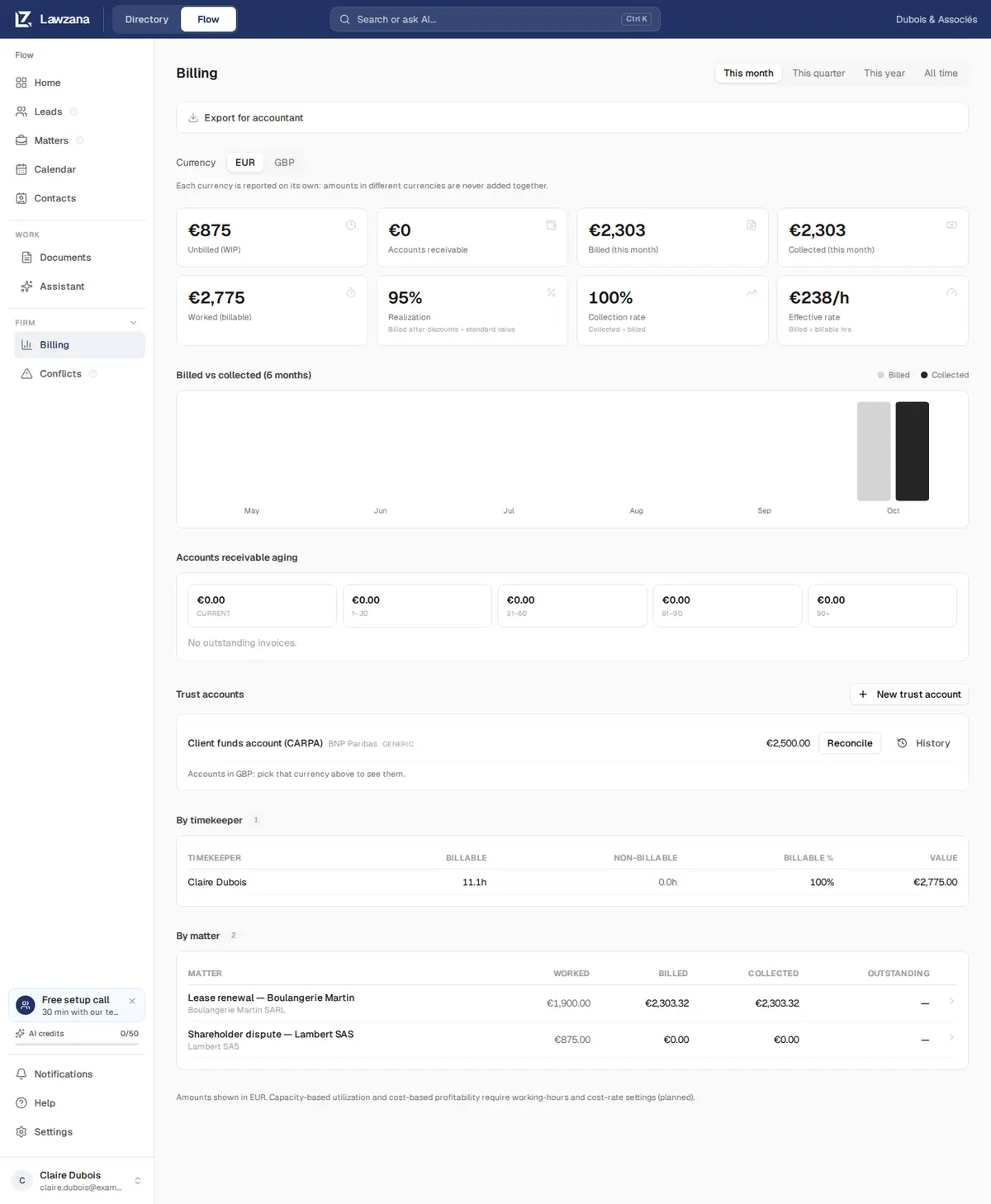
نظرة شاملة على مستوى المكتب لأموالك: ما تم إنجازه، وما تم فوترته وتحصيله، وما يدين به العملاء، وحسابات الأمانة (الوديعة) الخاصة بك، بالإضافة إلى إمكانية التصدير للمحاسب.
استخدم محدد الفترة في الزاوية العلوية اليسرى للتبديل بين هذا الشهر، وهذا الربع، وهذا العام، وكل الأوقات. تتبع الفترات يوم التقويم الخاص بك.
عندما يصدر مكتبك فواتير بأكثر من عملة واحدة، يظهر محول العملة. يتم إعداد تقارير كل عملة بشكل منفصل: لا يتم أبداً جمع المبالغ ذات العملات المختلفة معاً، ولا يقوم Flow بالتحويل بينها.
بطاقات الملخص#
| البطاقة | ما تحسبه |
|---|---|
| غير مفوتر (أعمال قيد التنفيذ) | جميع الأوقات والمصروفات القابلة للفوترة (مع هامش الربح) التي لم تُدرج بعد في فاتورة صادرة، حتى اليوم، أياً كانت الفترة. يُحسب الوقت الذي لا يحتوي على سعر محدد كصفر |
| الحسابات المدينة | ما يدين به العملاء حتى الآن: أرصدة الفواتير الصادرة والمدفوعة جزئياً |
| المفوتر (للفترة) | الإجماليات شاملة الضريبة للفواتير الصادرة خلال الفترة. تُحسب الفواتير المشطوبة؛ بينما لا تُحسب الفواتير الملغاة |
| المحصل (للفترة) | المدفوعات المستلمة خلال الفترة، وفقاً لتاريخ الدفع |
| المنجز (قابل للفوترة) | قيمة الوقت القابل للفوترة المسجل في الفترة، سواء تم فوترته أم لا |
| التحصيل الفعلي (Realization) | بالنسبة للوقت المدرج في الفواتير الصادرة خلال الفترة: ما تم تحصيله فعلياً مقابل ذلك، بعد الخصومات وبنود الائتمان، مقسوماً على قيمته بالأسعار القياسية. 95% تعني أنه تم التنازل عن 5% |
| معدل التحصيل | المحصل مقسوماً على المفوتر للفترة. قد يُظهر الشهر الذي يتم فيه سداد فواتير أقدم نسبة تتجاوز 100% |
| المعدل الفعلي | أتعاب الوقت المحتسبة مقسومة على الساعات المفوترة: ما حققته الساعة الواحدة فعلياً |
تُظهر خانتا التحصيل الفعلي ومعدل التحصيل شرطة (-) عند عدم وجود ما يمكن قياسه (عدم وجود وقت مفوتر، أو عدم فوترة أي شيء في الفترة)، بدلاً من عرض 0% أو 100% بشكل مضلل.
المفوتر مقابل المحصل#
يقارن رسم بياني لمدة ستة أشهر، شهراً بشهر، بين الفواتير التي أصدرتها والمدفوعات التي استلمتها، لتتمكن من رؤية مسار تدفقاتك النقدية في لمحة خاطفة.
تعتيق الحسابات المدينة#
يتم تجميع الأرصدة المستحقة وفقاً لعدد الأيام التي تجاوزت فيها تاريخ استحقاقها: الحالية (لم تستحق بعد)، من 1 إلى 30، ومن 31 إلى 60، ومن 61 إلى 90، وأكثر من 90 يوماً. يتحول تصنيف أكثر من 90 يوماً إلى اللون الأحمر عندما لا تكون قيمته صفراً. أسفل هذه التصنيفات، تعرض القائمة رقم كل فاتورة مستحقة، وقضيتها، وتاريخ استحقاقها، وعمر الدين، ورصيدها.
انقر فوق تذكير في أي فاتورة مستحقة لإرسال تذكير بالدفع عبر البريد الإلكتروني إلى العميل يحتوي على رابط للفاتورة. يعرض Flow أولاً الجهة المستلمة والرصيد، ثم يوضح الصف وقت إرسال التذكير. تتلقى كل فاتورة تذكيراً واحداً كحد أقصى كل 24 ساعة. يمكن لأي شخص يملك صلاحية تعديل القضية إرسال تذكير أيضاً من الفاتورة نفسها؛ راجع الفوترة.
حسابات الأمانة#
يسرد قسم حسابات الأمانة حسابات الوديعة الخاصة بك بالعملة المحددة. يمكنك إنشاءها وتسويتها وأرشفتها هنا. راجع محاسبة الأمانات.
حسب مسجل الوقت وحسب القضية#
يختتم جدولان هذه الصفحة:
- حسب مسجل الوقت: للفترة المحددة، الساعات القابلة للفوترة وغير القابلة للفوترة، ونسبة الساعات القابلة للفوترة %، وقيمة الوقت القابل للفوترة لكل شخص
- حسب القضية: لكل الأوقات، أياً كانت الفترة: ما تم إنجازه، ومفوترته، وتحصيله، والمتبقي لكل قضية؛ ويرتبط كل صف بعلامة تبويب الفوترة الخاصة بتلك القضية. يتم سرد أول 25 قضية؛ ويعرض خيار إظهار الكل بقية القضايا
التصدير للمحاسب#
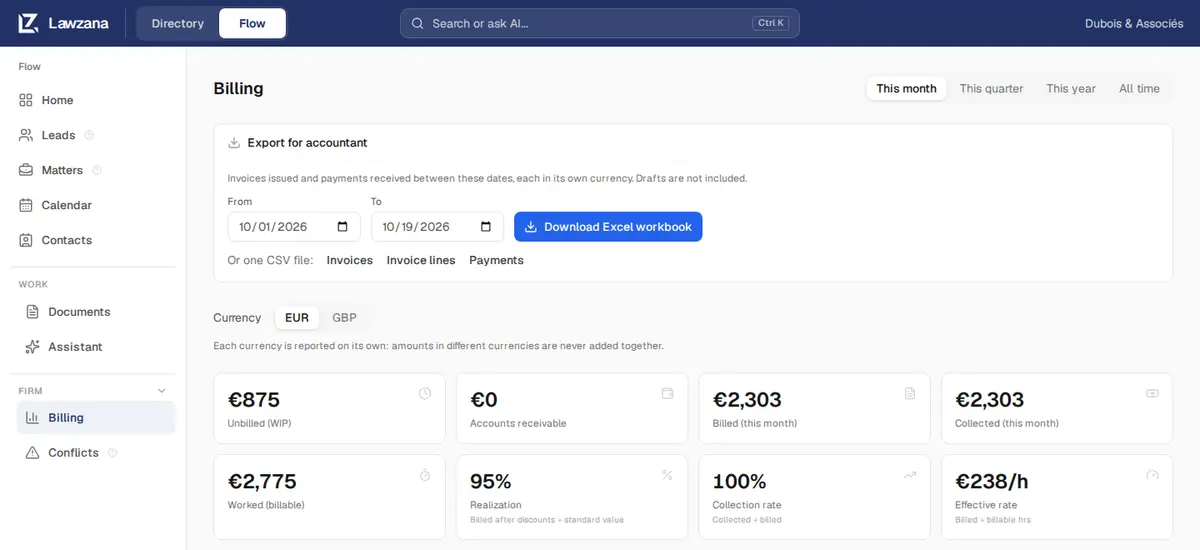
انقر فوق تصدير للمحاسب، وحدد من وإلى (يبدأ تلقائياً بالفترة المعروضة على الشاشة)، ثم انقر فوق تنزيل مصنف Excel، أو قم بتنزيل ملف CSV واحد: الفواتير، أو بنود الفواتير، أو المدفوعات.
- يحتوي ملف التصدير على الفواتير الصادرة والمدفوعات المستلمة بين تلك التواريخ. يتم استبعاد المسودات. وتُدرج الفواتير الملغاة مع تحديدها كملغاة (Void)، حتى لا تحدث فجوات في تسلسل الأرقام لديك
- يحتوي مصنف العمل على ثلاث أوراق عمل. تسرد الفواتير الرقم، والتواريخ، والحالة، والعميل، وجهة اتصال الفوترة، والبريد الإلكتروني، والرقم الضريبي، والبلد، والقضية، والعملة، والمجموع الفرعي، والخصم، والضريبة، والإجمالي، والمدفوع، والمشطوب، والرصيد. تسرد بنود الفواتير كل بند مع نوعه، ووصفه، وتاريخه، والكمية، والسعر، والمبلغ. تسرد المدفوعات كل دفعة مع تاريخها، ومبلغها، وعملتها، وطريقتها، ومرجعها، والعميل
- تبقى المبالغ بالعملة الخاصة بكل فاتورة، مع وجود عمود مخصص للعملة. ويتولى المحاسب الخاص بك قيد أي فروق في أسعار الصرف
راجع الفوترة وتتبع الوقت لمعرفة مصادر هذه الأرقام.