

Billing Dashboard
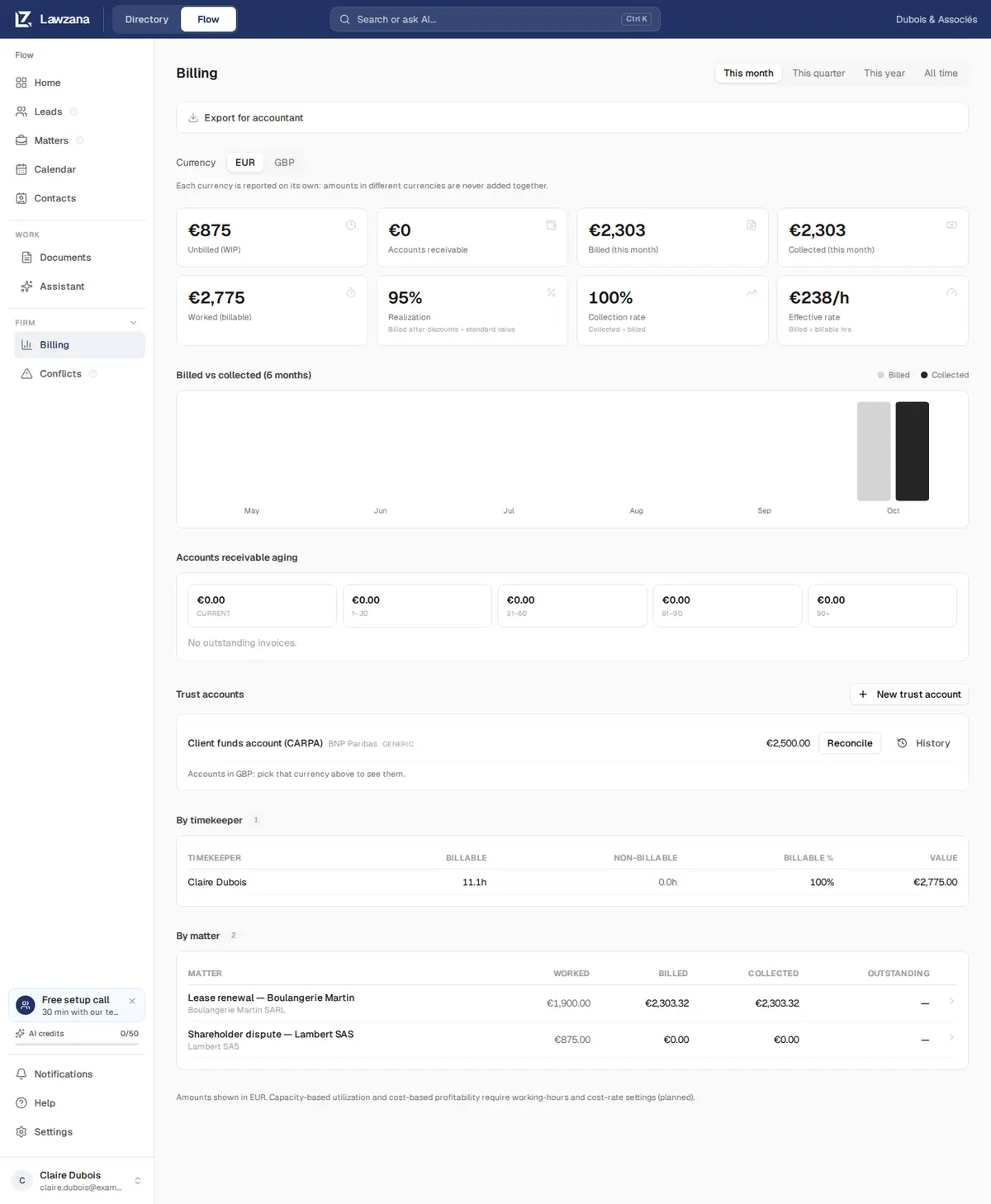
A firm-wide view of your money: what you've worked, billed and collected, what clients still owe, your trust accounts, and an export for your accountant.
Use the period selector in the top right to switch between This month, This quarter, This year and All time. Periods follow your own calendar day.
When your firm bills in more than one currency, a Currency switcher appears. Each currency is reported on its own: amounts in different currencies are never added together, and Flow doesn't convert between them.
Summary Cards#
| Card | What it counts |
|---|---|
| Unbilled (WIP) | All billable time and expenses (with markup) not yet on an issued invoice, today, whatever the period. Time without a rate counts as zero |
| Accounts receivable | What clients still owe: the balances of issued and partly paid invoices |
| Billed (for the period) | Totals, tax included, of invoices issued in the period. Written-off invoices count; voided ones don't |
| Collected (for the period) | Payments received in the period, by payment date |
| Worked (billable) | The value of billable time dated in the period, billed or not |
| Realization | For the time on invoices issued in the period: what was actually charged for it, after discounts and credit lines, divided by its value at standard rates. 95% means 5% was given away |
| Collection rate | Collected divided by billed for the period. A month in which older invoices get paid can show more than 100% |
| Effective rate | Time fees charged divided by the hours billed: what an hour really earned |
Realization and collection rate show a dash when there is nothing to measure (no billed time, or nothing billed in the period), rather than a misleading 0% or 100%.
Billed vs Collected#
A six-month chart compares, month by month, the invoices you issued with the payments you received, so you can see the direction of your cash flow at a glance.
Accounts Receivable Aging#
Open balances are grouped by how many days they are past their due date: Current (not yet due), 1 to 30, 31 to 60, 61 to 90, and over 90 days. The over-90 bucket turns red when it isn't zero. Below the buckets, the list shows each open invoice's number, matter, due date, age and balance.
Click Remind on an open invoice to email the client a payment reminder with a link to the invoice. Flow shows who gets it and the balance first, and the row then shows when the reminder went out. Each invoice gets at most one reminder every 24 hours. Anyone who can edit the matter can also send a reminder from the invoice itself; see Invoicing.
Trust Accounts#
The Trust accounts section lists your trust accounts in the selected currency. Create, reconcile and archive them here. See Trust Accounting.
By Timekeeper and By Matter#
Two tables round out the page:
- By timekeeper: for the selected period, billable and non-billable hours, billable %, and the value of billable time per person
- By matter: all time, whatever the period: worked, billed, collected and outstanding per matter; each row links to that matter's Billing tab. The first 25 matters are listed; Show all lists the rest
Export for Accountant#
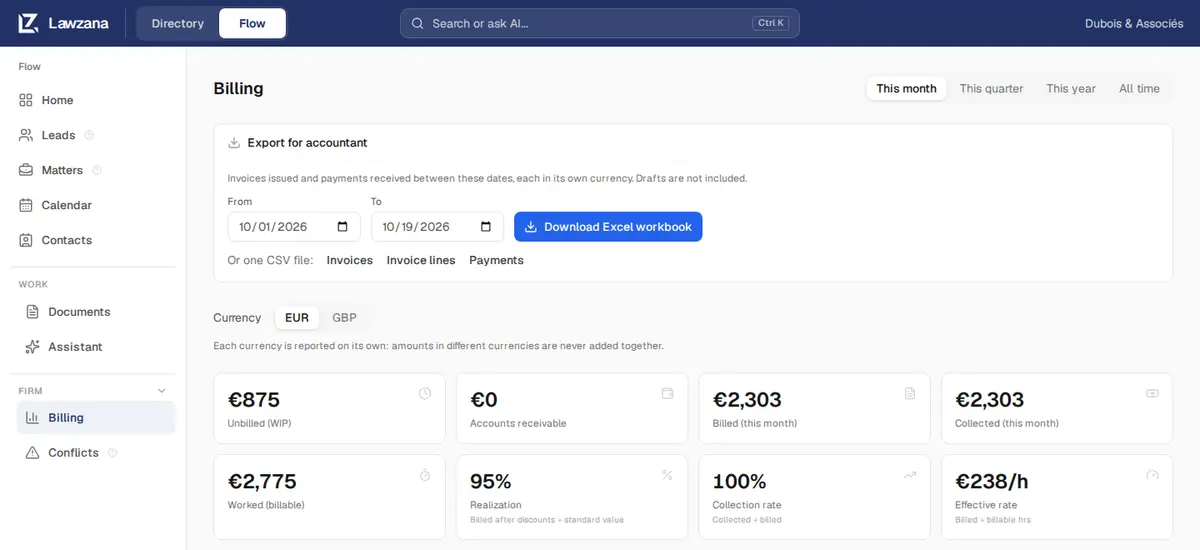
Click Export for accountant, choose From and To (it starts on the period on screen), and click Download Excel workbook, or download one CSV file: Invoices, Invoice lines or Payments.
- The export holds the invoices issued and the payments received between those dates. Drafts are left out. Voided invoices are included and marked Void, so your numbering has no gaps
- The workbook has three sheets. Invoices lists number, dates, status, client, billing contact, email, tax ID and country, matter, currency, subtotal, discount, tax, total, paid, written off and balance. Invoice lines lists each line with its type, description, date, quantity, rate and amount. Payments lists each payment with its date, amount, currency, method, reference and client
- Amounts stay in each invoice's own currency, with a currency column. Your accountant books any exchange difference
See Invoicing and Time Tracking for where these numbers come from.