

Client Accounts
A client account holds what your firm needs to bill a client: who invoices are addressed to, the billing email, address, tax ID, payment terms, and, when needed, the client's own currency and rates. In Flow these are the client's Billing details. They belong to the client, so every matter for that client uses them. You edit them in one place: the client's contact page.
Setting Up a Client's Billing#
A client gets billing details in one of two ways:
- From a matter. Open the matter's Billing tab → Billing details and click Set up client billing. Flow fills in the name, email and address from the client's contact (or the company they work for), then opens the client's contact page so you can check them. If the matter has no client contact yet, Flow links the contact that has the matter's client email, or creates one, and adds it as the matter's client.
- From the contact page. A contact who is the client on a matter shows a Set up billing button. Click it to create the billing details from the contact's email and address.
Until a client has billing details, invoices are addressed to the matter's client name and email.
A matter whose client already has billing details uses them automatically. If you replace a matter's client with another contact, the matter switches to the new client's billing details, or to none until the new client has them.
Billing Details on the Contact Page#
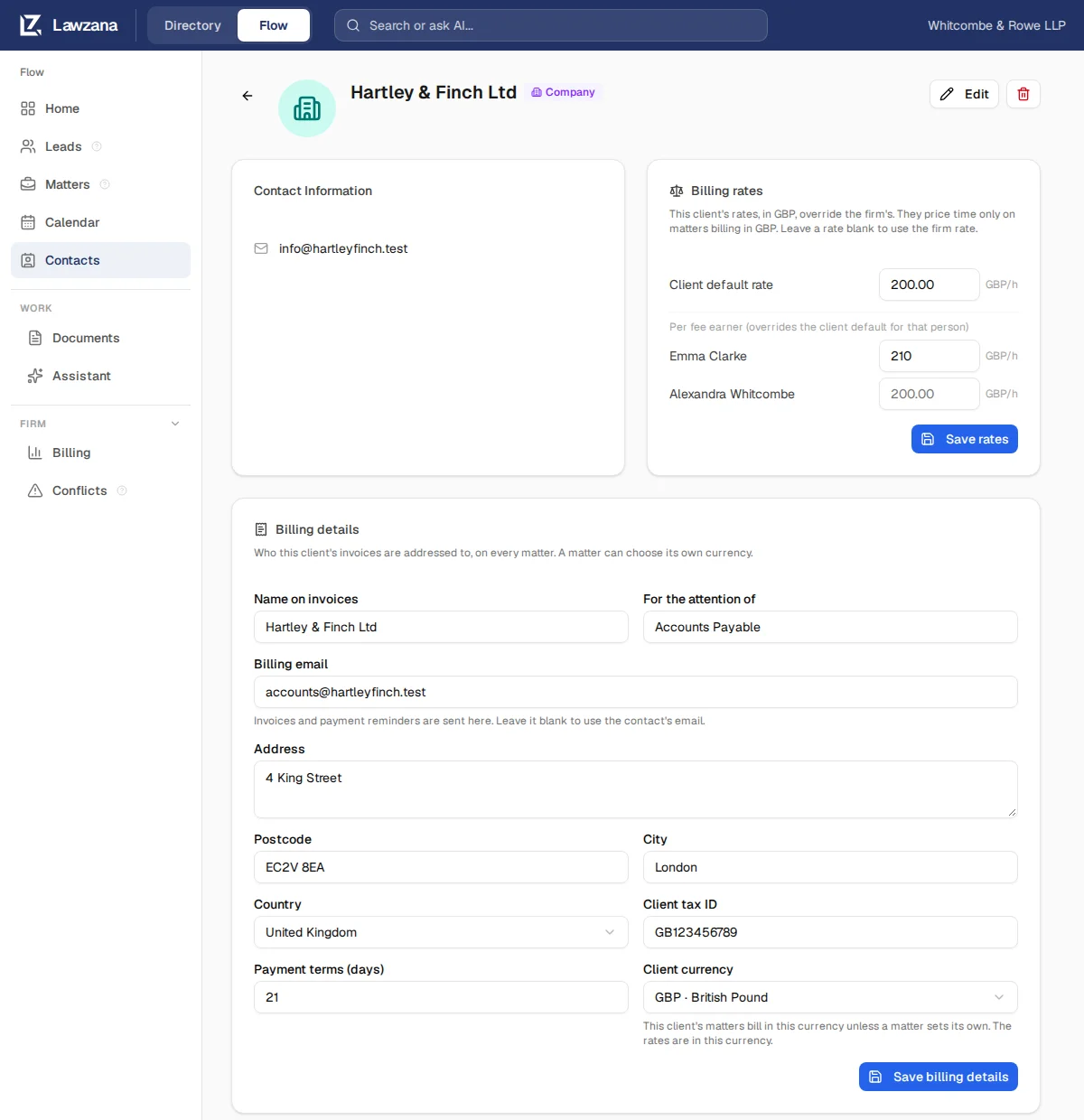
Open the client's contact page. The Billing details card holds:
- Name on invoices and For the attention of
- Billing email: invoices and payment reminders are sent here. Leave it blank to use the contact's email
- Address, Postcode, City and Country
- Client tax ID
- Payment terms (days): leave it blank to use your firm's default
- Client currency: the currency the client's matters bill in, unless a matter sets its own
Click Save billing details. The change applies to all of the client's matters. Owners, admins and members can edit the card. Viewers see it read-only, and so does anyone an ethical wall keeps off one of the client's matters, since the change would reach that matter's invoices.
Billing Details on a Matter#
A matter's Billing tab → Billing details shows the client's billing details read-only. Click Edit on client page to change them (viewers see View on client page).
The one thing a matter sets for itself is its Currency. Choose one and click Save currency. Owners, admins and members who can edit the matter can change it.

How a Matter's Currency Is Chosen#
Each matter bills in one currency. Flow uses the first of these that is set:
- The currency set on the matter in its Billing details
- The Client currency, from the Billing details card on the client's contact page
- Your firm's currency, from Settings → Invoicing & rates (or, if none is set there, the billing default in Settings → Engagement Letters)
- The currency of your firm's country, and US dollars only as a last resort
Under Currency, the matter's Billing details tells you where the current one comes from: Chosen for this matter., The client's currency. or Your firm's currency. New time and expenses take the matter's currency when they're logged and keep it.
A matter's currency can only change when nothing would be left behind. While the matter has unbilled, priced time or expenses, or a draft invoice, in another currency, Flow refuses the change and nothing is saved. Bill or delete that work first. Time without a rate doesn't block a change, and switching back to the currency the work is already in always works. The same rule applies to a Client currency, for every matter that follows it.
When a matter starts using a client's billing details (or switches to a new client's), and the client's currency would leave the matter's unbilled work behind, the matter keeps its current currency as its own.
Billing Rates#
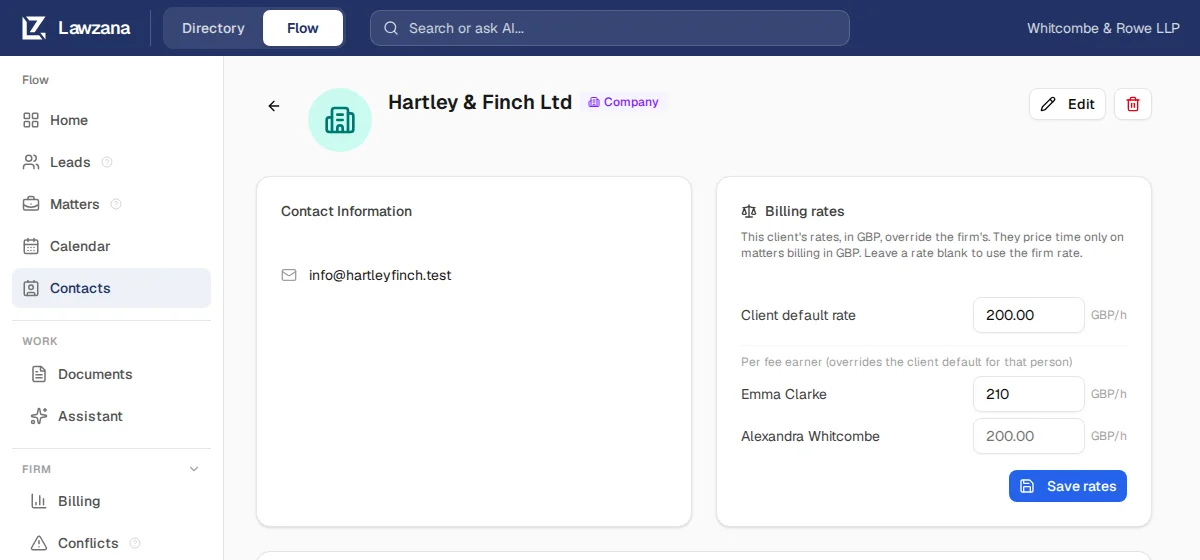
Most clients bill in your firm's currency at your firm's rates, and you can skip this. For a client billed at special rates, use the Billing rates card on the client's contact page:
- Client default rate: an hourly rate for this client
- One rate per fee earner, which overrides the client default for that person
Click Save rates. Leave a rate blank to use the firm's rate. The card appears once the client has billing details.
Rates here are in the client's currency (the Client currency in Billing details, or your firm's if it is not set) and only price time on matters that bill in that currency. A client billed in pounds needs rates in pounds: your euro rates don't apply, and that client's time shows Needs rate until it has one. See Time Tracking for which rate wins.
If you change a client's Client currency while it has client rates, update the rates too: the numbers stay the same but are now read in the new currency. Time waiting for a rate is priced when you next click Save rates, not when the currency changes.
Viewers, and anyone an ethical wall keeps off one of the client's matters, see the card read-only.
Finding Client Accounts#
- Go to Contacts in the sidebar and open the Client Accounts tab. Each account opens the client's contact page at its billing details
- On a matter's Overview, the client card links to the client's contact and, when the client has them, to its Billing details
- A matter's Billing details links to the client's contact page
The client's contact page shows the client's matters, its billing details and its rates.
Portal Access#
Portal access is set up per matter, from the matter's Share with Client button. It lets clients view shared documents, track milestones, and send messages to your team. See Client Portal for full details.