

Expenses & Disbursements
Record the costs you incur on a matter, such as filing fees, courier charges or expert fees, so they can be billed to the client alongside your time.
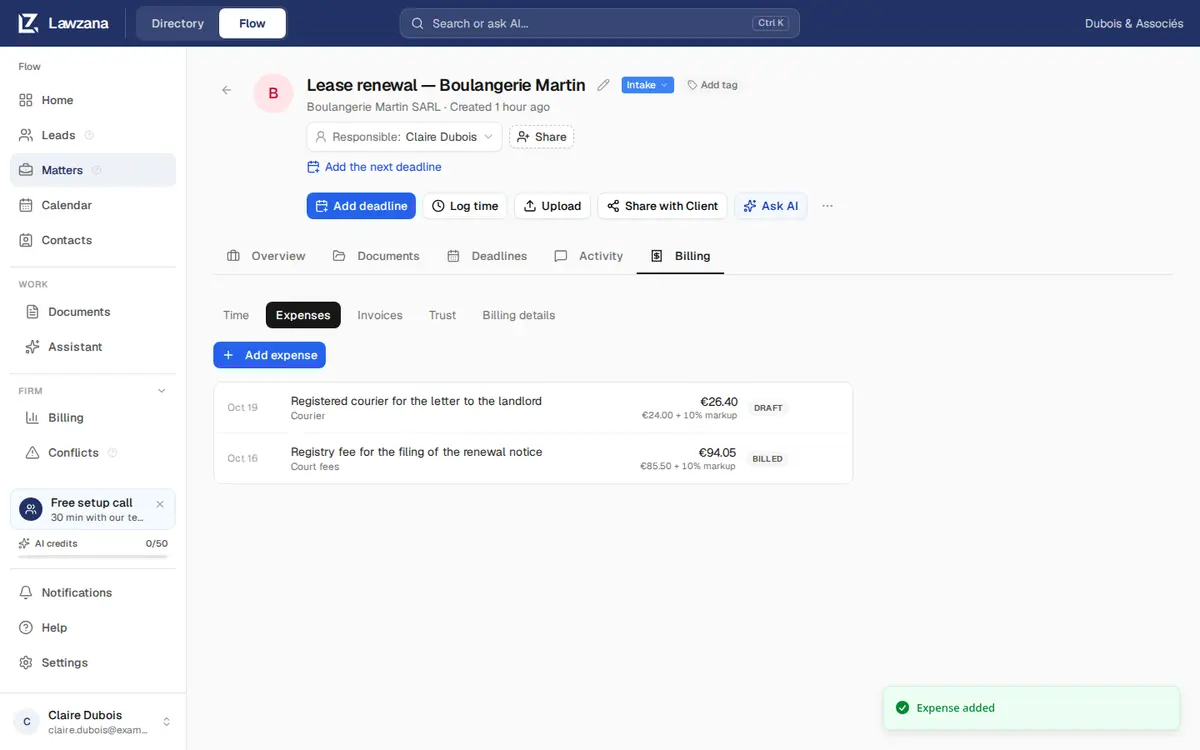
Expenses live on each matter under the Billing tab → Expenses.
Adding an Expense#
Click Add expense and fill in:
- Date: when the cost was incurred
- Amount: in the matter's currency
- Category: free text, for example "Court fees"
- Description: printed on the invoice line (the category is used if you leave it empty)
- Billable: switch it off for costs you'll absorb
- Markup %: an optional uplift added when the expense is billed. €24.00 with a 10% markup bills €26.40
Everyone except viewers can add expenses. Members can edit and delete their own expenses until they're billed; owners and admins can edit or delete anyone's.
Getting Expenses onto an Invoice#
Billable expenses are picked up automatically the next time you click New invoice on the matter, whatever its fee arrangement, including flat-fee and contingency matters. There's nothing extra to do. See Invoicing.
To avoid charging an expense, delete it or switch off Billable before you build the invoice. If it's already on a draft invoice, remove that line from the draft; the expense stays unbilled for a later invoice.
Expense Status#
| Status | Meaning |
|---|---|
| Draft | Recorded, not yet billed |
| Billed | On an issued invoice and locked |
If an invoice is voided, its expenses go back to Draft and can be billed again.