

経費と立替金
申立手数料、宅配便の配送料、専門家費用など、案件で発生した費用を記録することで、稼働時間とともにクライアントへ請求できるようになります。
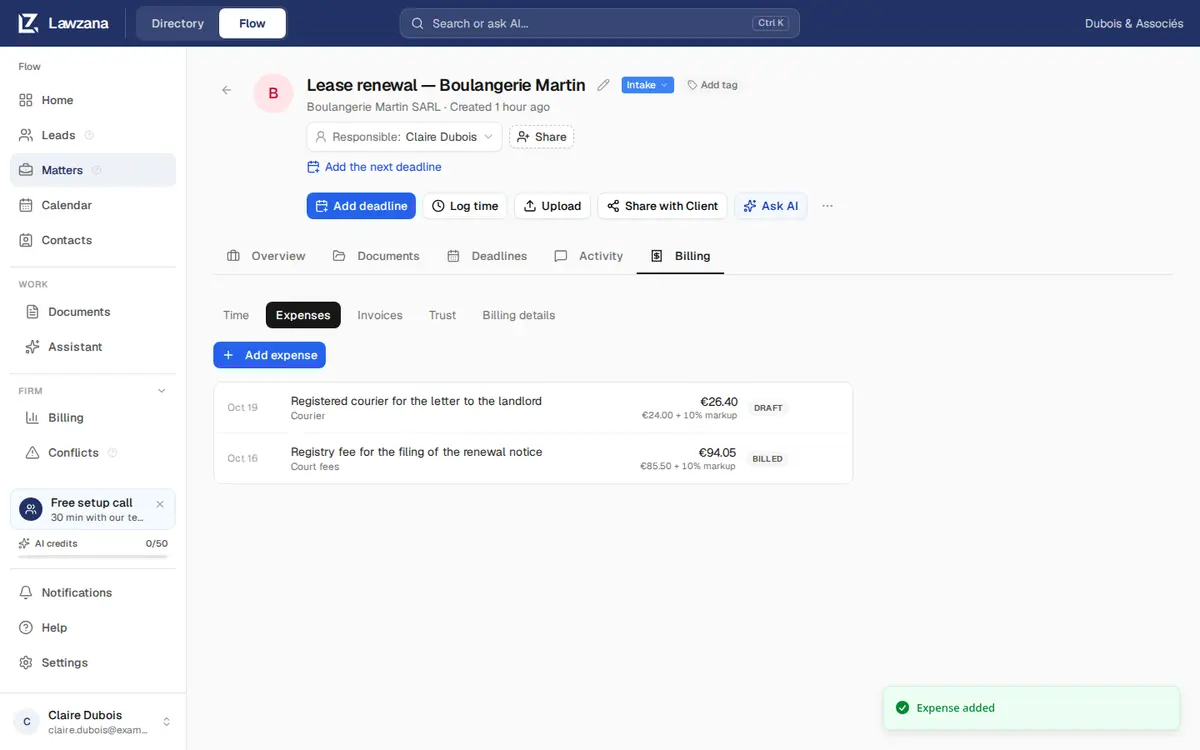
経費は各案件の請求タブ → 経費に表示されます。
経費の追加#
経費を追加をクリックし、以下を入力します。
- 日付: 費用が発生した日
- 金額: 案件の通貨単位
- カテゴリ: 任意のテキスト(例: 「裁判所手数料」)
- 説明: 請求書の明細行に印字されます(空欄の場合はカテゴリ名が使用されます)
- 請求可能: 事務所側で負担する費用の場合はオフにします
- マークアップ %: 経費を請求する際に追加できる任意の上乗せ率。24.00ユーロに10%のマークアップを適用すると26.40ユーロで請求されます
閲覧者(ビューアー)以外のすべてのユーザーが経費を追加できます。メンバーは請求されるまで自身が登録した経費を編集・削除できます。オーナーおよび管理者はすべてのユーザーの経費を編集・削除できます。
経費を請求書に反映する#
請求可能な経費は、固定報酬や成功報酬の案件も含め、その報酬体系にかかわらず、次回その案件で新しい請求書をクリックした際に自動的に取得されます。追加の作業は一切不要です。請求書発行をご覧ください。
経費の請求を避けたい場合は、請求書を作成する前にその経費を削除するか、請求可能をオフにしてください。すでに下書きの請求書に含まれている場合は、下書きからその行を削除します。これにより、その経費は未請求のまま保持され、以降の請求書に反映できます。
注記
請求書内で複数の通貨を混在させることはできません。請求書と異なる通貨で記録された経費は除外され、下書き上で計算されます。
経費のステータス#
| ステータス | 意味 |
|---|---|
| 下書き | 記録済み、未請求 |
| 請求済み | 発行済み請求書に含まれ、ロックされた状態 |
請求書が無効化された場合、その経費は下書きに戻り、再度請求できるようになります。