

Καταπιστευτική Λογιστική (Trust Accounting)
Διατηρήστε αρχείο των χρημάτων πελατών που κατέχετε, με καθολικό ανά υπόθεση και λογαριασμούς καταπιστεύματος (trust accounts) της εταιρείας, τους οποίους μπορείτε να συμφωνείτε με το αντίγραφο κίνησης της τράπεζάς σας.
Λογαριασμοί Καταπιστεύματος της Εταιρείας#
Διαχειριστείτε τους λογαριασμούς καταπιστεύματος από την ενότητα Trust accounts του Πίνακα Ελέγχου Χρεώσεων. Χρειάζεστε τουλάχιστον έναν λογαριασμό για να μπορέσετε να καταχωρίσετε εγγραφές σε μια υπόθεση.
Κάντε κλικ στο New trust account και συμπληρώστε:
- Account name, για παράδειγμα «Client Trust Account»
- Bank (προαιρετικό)
- Currency, έναν τριψήφιο κωδικό όπως EUR ή GBP
- Jurisdiction, μια ετικέτα ελεύθερου κειμένου που εμφανίζεται ως tag
Δημιουργήστε έναν λογαριασμό καταπιστεύματος ανά πραγματικό τραπεζικό λογαριασμό. Ένας λογαριασμός υποστηρίζει ένα νόμισμα, επομένως μια εταιρεία που διακρατεί χρήματα πελατών σε δύο νομίσματα χρειάζεται δύο λογαριασμούς. Κάθε λογαριασμός εμφανίζει το λογιστικό του υπόλοιπο, το οποίο αποτελεί το άθροισμα των υπολοίπων των επιμέρους υποθέσεών του.
Καθολικό Καταπιστεύματος ανά Υπόθεση#
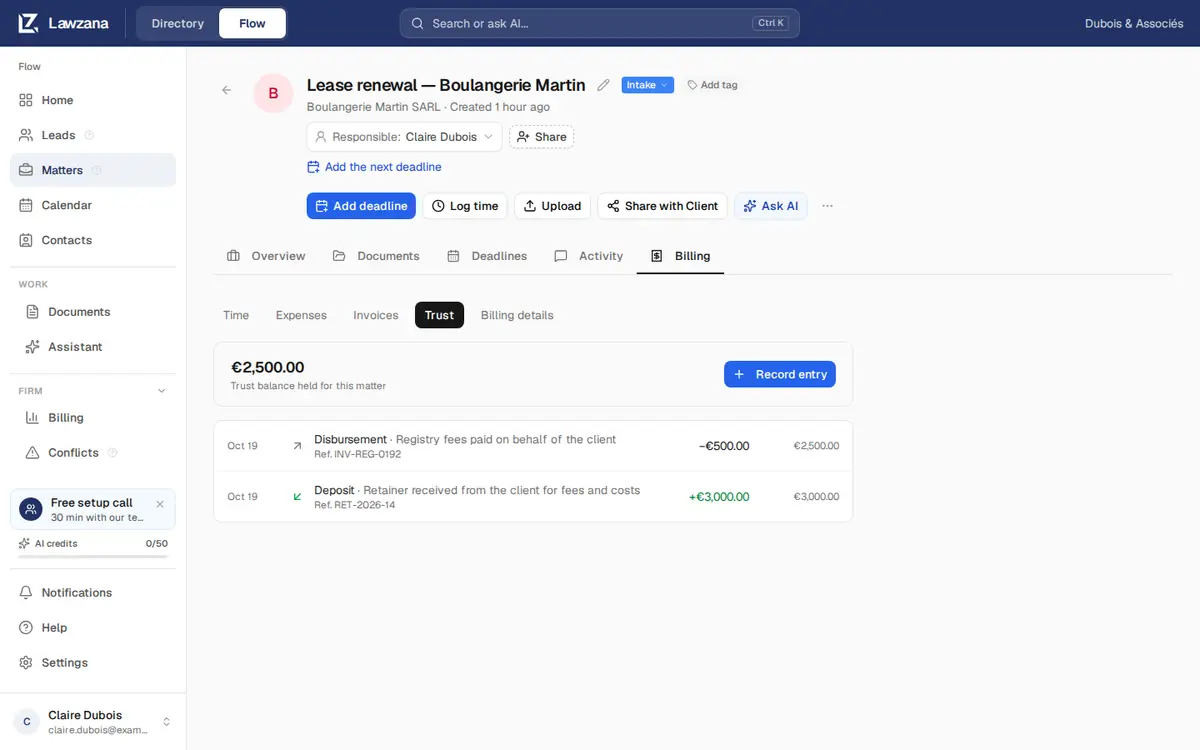
Τα χρήματα πελάτη κάθε υπόθεσης βρίσκονται στην καρτέλα Billing → Trust. Η καρτέλα εμφανίζει το υπόλοιπο που διακρατείται για την υπόθεση σε κάθε λογαριασμό (δεν αθροίζεται ποτέ μεταξύ διαφορετικών λογαριασμών) και ένα καθολικό με κάθε εγγραφή, τον αριθμό αναφοράς της και το τρέχον υπόλοιπο.
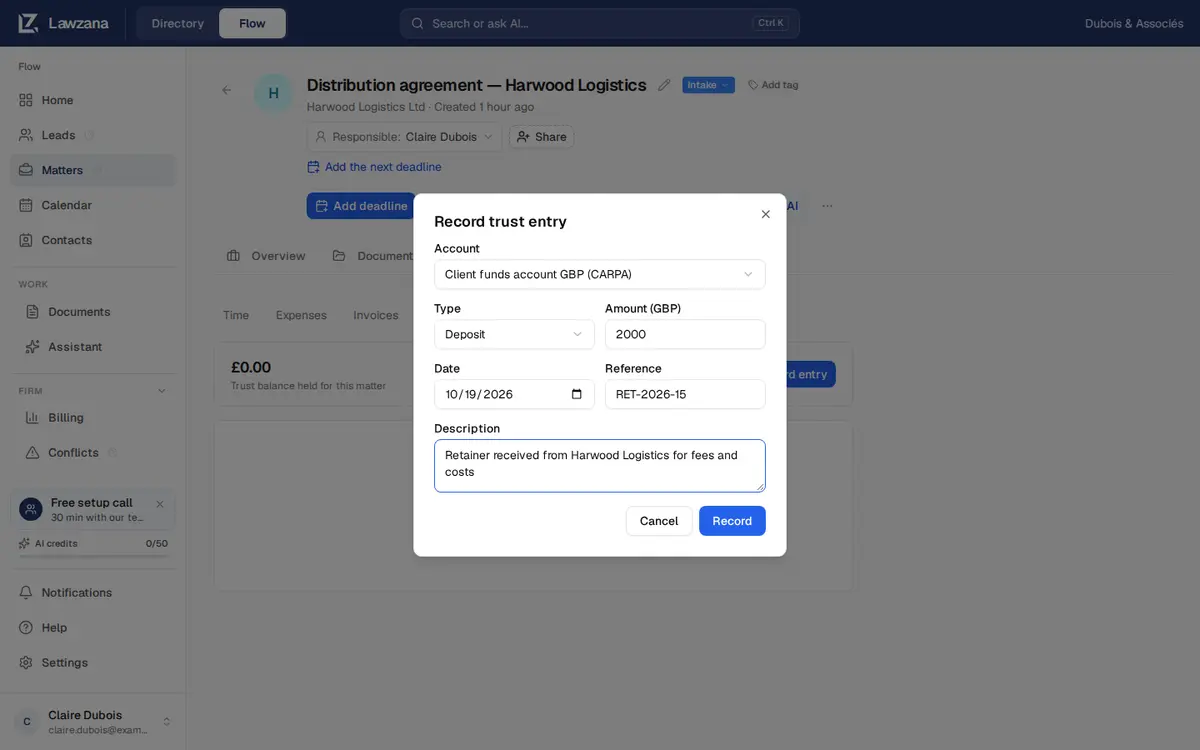
Κάντε κλικ στο Record entry και συμπληρώστε:
- Account: επιλέγεται αρχικά ο λογαριασμός στο νόμισμα της υπόθεσης
- Type: δείτε τον παρακάτω πίνακα
- Amount, στο νόμισμα του λογαριασμού
- Date
- Reference, για παράδειγμα αριθμός επιταγής ή κωδικός μεταφοράς
- Description
| Τύπος | Χρήση |
|---|---|
| Deposit | Χρήματα που εισπράχθηκαν από ή για λογαριασμό του πελάτη στον λογαριασμό καταπιστεύματος |
| Disbursement | Χρήματα που πληρώθηκαν από τον λογαριασμό καταπιστεύματος για τον πελάτη: δικαστικά έξοδα, πληρωμή προς τρίτο ή μεταφορά στον λογαριασμό γραφείου για την εξόφληση τιμολογίου |
| Transfer in / Transfer out | Μεταφορά χρημάτων πελάτη μεταξύ υποθέσεων ή λογαριασμών. Κάθε σκέλος καταγράφεται ξεχωριστά, επομένως πρέπει να καταχωρίσετε και τα δύο |
Οι εγγραφές δεν μπορούν να επεξεργαστούν ή να διαγραφούν. Για να διορθώσετε ένα λάθος, καταχωρίστε μια νέα εγγραφή που το αντιλογίζει, σύμφωνα με όσα ορίζουν οι ισχύοντες κανονισμοί σας.
Ο Κανόνας Υπερανάληψης (Overdraw Rule)#
Τα χρήματα πελάτη μιας υπόθεσης δεν μπορούν ποτέ να πέσουν κάτω από το μηδέν, σε οποιαδήποτε ημερομηνία. Το Flow ελέγχει το καθολικό με χρονολογική σειρά και απορρίπτει μια εκταμίευση για έναν από τους δύο παρακάτω λόγους:
- Ανεπαρκές υπόλοιπο κατά τη συγκεκριμένη ημερομηνία. Το μήνυμα αναφέρει το διαθέσιμο ποσό.
- Επαρκές τότε, αλλά όχι μεταγενέστερα. Μια αναδρομική εκταμίευση θα άφηνε μια μεταγενέστερη πληρωμή χωρίς αντίκρισμα. Χρησιμοποιήστε μεταγενέστερη ημερομηνία ή ελέγξτε τις μεταγενέστερες εγγραφές.
Συμφωνία Υπολοίπων (Reconciliation)#
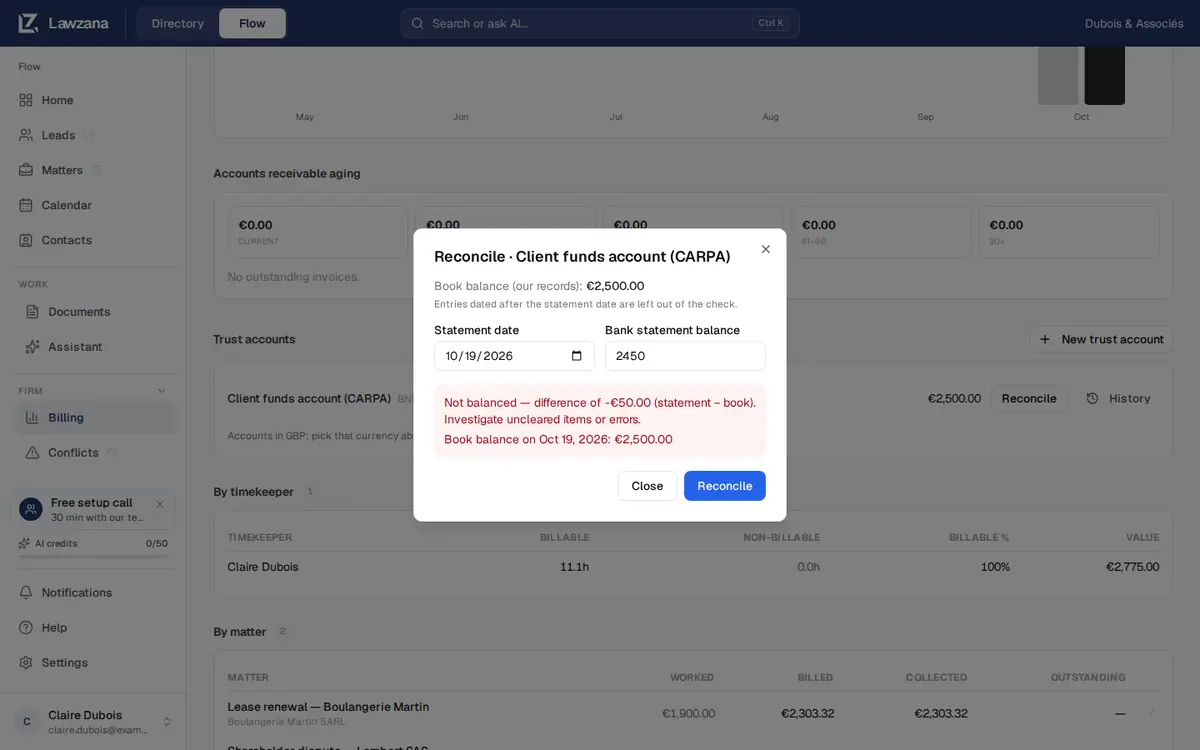
Στον Πίνακα Ελέγχου Χρεώσεων, κάντε κλικ στο Reconcile σε έναν λογαριασμό. Εισαγάγετε την Statement date της τράπεζας (όχι μελλοντική ημερομηνία) και το Bank statement balance, και στη συνέχεια κάντε κλικ στο Reconcile. Το Flow το συγκρίνει με το λογιστικό υπόλοιπο κατά την ημερομηνία αυτή (εγγραφές με ημερομηνία μεταγενέστερη της ημερομηνίας του αντιγράφου εξαιρούνται) και επαληθεύει ότι τα καθολικά των υποθέσεων αθροίζουν στο σύνολο του λογαριασμού.
Το αποτέλεσμα είναι Balanced, ή Not balanced με τη διαφορά (τραπεζικό αντίγραφο μείον λογιστικό υπόλοιπο) προς διερεύνηση. Και τα δύο αποτελέσματα διατηρούνται, και το History παραθέτει κάθε προηγούμενη συμφωνία με την ημερομηνία του αντιγράφου κίνησης, το τραπεζικό και λογιστικό υπόλοιπο, καθώς και το τελικό αποτέλεσμα.
Η Περίοδος Συμφωνίας#
Μόλις ένας λογαριασμός συμφωνηθεί ως Balanced, η περίοδος κλείνει: οποιαδήποτε εγγραφή με ημερομηνία ίση ή προγενέστερη της ημερομηνίας του αντιγράφου απορρίπτεται. Ορίστε ημερομηνία μεταγενέστερη της ημέρας αυτής. Η ημερομηνία του αντιγράφου κίνησης βασίζεται στην ημερολογιακή ημέρα του ατόμου που πραγματοποίησε τη συμφωνία, ώστε ένας συνάδελφος σε άλλη ζώνη ώρας να έχει το ίδιο αποτέλεσμα.
Μια συμφωνία που δεν εξισώνεται δεν κλείνει καμία περίοδο. Εντοπίστε την αιτία (συχνά πρόκειται για κατάθεση ή πληρωμή που δεν έχει καταγραφεί ακόμα), καταχωρίστε την εγγραφή που λείπει με την πραγματική της ημερομηνία και, στη συνέχεια, πραγματοποιήστε ξανά τη συμφωνία για το ίδιο αντίγραφο κίνησης.
Αρχειοθέτηση#
Η επιλογή Archive εμφανίζεται μόνο όταν το υπόλοιπο ενός λογαριασμού είναι μηδέν. Ένας αρχειοθετημένος λογαριασμός δεν δέχεται νέες εγγραφές και αφαιρείται από τη λίστα.